
Frequently Asked Questions
Our Products
You receive a lifetime valid license, meaning this is a one-time payment. You do not subscribe and do not have to pay annual fees. You can use the software as long as you possess the license key!
Yes. If you are interested in additional Microsoft products that are not listed in the shop, you can contact us. Nearly all Microsoft products are available.
Visio is an innovative solution for easily visualizing data-driven business process flows—supported by powerful features in Microsoft 365. In Microsoft Teams, you can easily create, access, and collaboratively edit Visio diagrams.
Yes. If you are interested in additional Microsoft products that are not listed in the shop, you can contact us. Nearly all Microsoft products are available.
Yes, Office 2021 is backward compatible and can open, edit, and save documents created with older Office versions. However, new features in Office 2021 may not be available in older versions.
Yes, Office 2024 is backward compatible and can open, edit, and save documents created with older Office versions. However, new features in Office 2024 may not be available in older versions.
Compared to older versions, Windows 11 offers a new and very clean interface. It also provides numerous features that significantly improve workflow. Additionally, enhanced security is offered thanks to modern features. Windows 11 is designed to help you work more efficiently with less stress. Therefore, upgrading can be worthwhile for any user currently using Windows 10 or older versions.
CAL stands for “Client Access License.” It is a license that grants users or devices the right to access the services or functions of a server. CALs are particularly relevant in the context of Microsoft server products such as Windows Server, SQL Server, Exchange Server, and others.
There are two main types of CALs:
1. User CALs: This type allows a specific user to access the server from any device (e.g., work PC, home PC, smartphone, etc.).
2. Device CALs: This type allows a specific device to be used by multiple users to access the server. This option can be more cost-effective when multiple users share the same device.
The choice between User CALs and Device CALs depends on the specific usage scenario within a company or organization. Microsoft offers these flexible licensing options to accommodate different business models.
CALs are necessary because Microsoft server operating systems and certain server products are licensed based on access rights. This means that, in addition to the server license itself, additional licenses are required to legally access the server.
While MS Planner is better suited for small and medium-sized projects, MS Project truly shows its strengths in large projects, comprehensive ERP resource planning, or linking multiple independent projects.
Because we source large volumes from major companies and various European procurement channels, we can keep prices extremely low. Additionally, all our products are delivered digitally, eliminating shipping costs.
Yes, the traditional Office 2021 package includes local versions of Word, Excel, PowerPoint, and Outlook. From the Professional edition onward, Access and Publisher are also included.
Yes, the traditional Office 2024 package includes local versions of Word, Excel, PowerPoint, and Outlook. From the Professional edition onward, Access and Publisher are also included.
The difference between Professional Plus and Microsoft Office Standard lies in the included applications. While Office Standard includes the same basic applications as Professional, Access and Publisher are not included.
We only provide legitimate activation keys that comply with European legislation and originate from the EU. You will also receive an invoice including VAT and proof of origin.
Only the product key and installation instructions are sent via email. No physical media or COA certificate of authenticity is provided.
All offered products have been verified under trade compliance regulations.
All our products are lifetime licenses. They can be activated once. After activation, reactivation is not possible in case of formatting or major hardware changes. The warranty is lifetime.
Microsoft Office 2021 Professional Plus is a comprehensive productivity suite that includes a wide range of applications such as Word, Excel, PowerPoint, OneNote, Outlook, Teams, Publisher, and Access.
Office 2021 Professional Plus includes Word, Excel, PowerPoint, Outlook, OneNote, Publisher, Access, and Teams.
Office 2024 Professional Plus includes Word, Excel, PowerPoint, Outlook, OneNote, Publisher, Access, and Teams.
Windows 10 allows full flexibility in installing applications from any source, while Windows 10 S only allows apps from the Microsoft Store to improve security and performance.
Known Errors
winget is a package manager for Windows that allows users to install, update, and manage software from the command line.
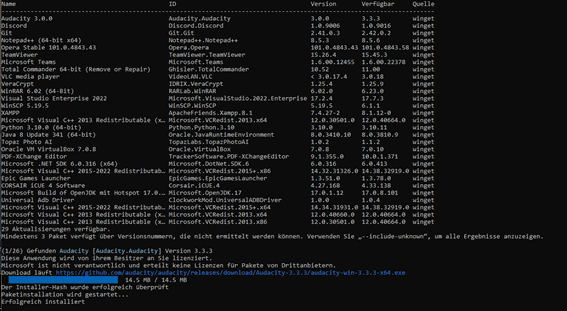
To update all installed programs, use:
Winget upgrade –all
More info: https://learn.microsoft.com/windows/package-manager/winget/
If you have purchased a Windows product that requires phone activation, follow these steps:
1. Press [Windows] + [R] and enter “slui 4”.
2. Select your country and click “Next”.
3. You will see an installation ID and a phone number.
4. Enter the numbers via phone and receive a confirmation ID.
5. Enter the confirmation ID.
6. Click “Activate Windows”.
7. Done.
Open CMD as administrator and enter:
slmgr /ipk XXXXX
slmgr /ato
Install the correct Office version from our download page and remove previous versions before installation.
Install the correct software and use the Office activation assistant.
setup.office.com is not compatible with your product key.
Payment / Delivery
After successful payment, you will receive your key and download link via email.
You can download the software immediately.
Invoice with VAT is sent after payment confirmation.
No physical media is provided.
Support is available 24/7.
Check your email or spam folder. If not found, contact us and we will resend it.
Some payment methods take up to 24 hours for confirmation. Delivery happens after confirmation.
Digital delivery is immediate after payment confirmation.
Electronic Software Delivery (ESD) means software is delivered digitally via email with a download link and product key.
Installation
Try:
1. Check internet
2. Disable firewall
3. Run as admin
4. Check system time
5. Use Microsoft tools
6. Try phone activation
Yes, but must be purchased separately. Ensure version compatibility.
Both are supported. Choose based on your system.
Try another browser or disable antivirus temporarily.
No. Requires:
– 64-bit CPU
– 4GB RAM
– 64GB storage
– TPM 2.0
– Secure Boot
Activation verifies authenticity and unlocks full functionality.
1 PC = 1 device
2 PC = 2 devices
Our Service
Support ends October 9, 2029.
Support ends October 9, 2029.
Most software works without issues.
Teams is a collaboration platform for chat, meetings, and file sharing.
Yes, 24/7 support via email or chat.